-
(13)HTML_폼태그HTML, CSS 2023. 3. 24. 16:42728x90
- 폼태그를 이용하여 홈페이지에 입력하는 블록을 만들 수 있다.
- 아래 링크에서 각 요소에 관한 설명을 볼 수 있다.
- https://jm-rograming.tistory.com/44
(6)HTML_기본문법
하이퍼 링크 - 다른 페이지 또는 사이트로 연결하는 링크(문자 또는 이미지) - 인라인 태그 링크에 사용할 문자 또는 이미지 ✔호스팅 서버 컴퓨터의 전체 또는 일정 공간을 이용할 수 있도록 임
jm-rograming.tistory.com
<!DOCTYPE html><html lang="en"><head><meta charset="UTF-8"><meta http-equiv="X-UA-Compatible" content="IE=edge"><meta name="viewport" content="width=device-width, initial-scale=1.0"><title>폼 태그</title></head><body><h2>폼 태그</h2><form action="#" method="post"><input type="hidden" name="hidden" value="서버로 전달될 값"><p>아이디: <input type="text" name="userid" id="userid" maxlength="20" placeholder="아이디를 입력하세요" required></p><p>비밀번호: <input type="password" name="userpw" id="userpw" maxlength="20" placeholder="비밀번호를 입력하세요" required></p><p>성별: <label for="male">남자</label><input type="radio" id="male" name="gender" value="남자" checked><label for="female">여자</label><input type="radio" id="female" name = "gender" value="여자"></p><p>취미: 운동<input type="checkbox" name = "hobby" value = "운동">음악감상<input type="checkbox" name = "hobby" value = "음악감상">영화감상<input type="checkbox" name = "hobby" value = "영화감상">게임<input type="checkbox" name = "hobby" value = "게임">등산<input type="checkbox" name = "hobby" value = "등산"></p><p>나이: <input type="text" name = "age" value="-1" readonly></p><p>주민번호: <input type="text" name="ssn" disabled></p><p>첨부파일: <input type="file" name = "file"></p><p>직업:<select name="job"><option value="프로그래머">프로그래머</option><option value="공무원">공무원</option><option value="전문직">전문직</option><option value="학생">학생</option><option value="취준생">취준생</option>
</select></p>
<p>자기소개</p><p><textarea name="content" cols="50" rows="5"></textarea></p><p>이메일: <input type="email"></p><p>웹사이트: <input type="url"></p><p>휴대폰번호: <input type="tel"></p>
<p>생년월일: <input type="date"></p>
<p>좋아하는 숫자: <input type="number" min="1" max="10" step="1"></p><p>좋아하는 색상 <input type="color"></p><p>검색어: <input type="search"></p><p>프로그래밍 능력: <input type="range" min="1" max="5" value="3"></p><p><input type="button" value="클릭하세요" onclick = "alert('안녕?~!')"><input type="reset" value="다시입력"><input type="submit" value="회원가입"><button type="button">버튼클릭</button></p></form>
</body></html>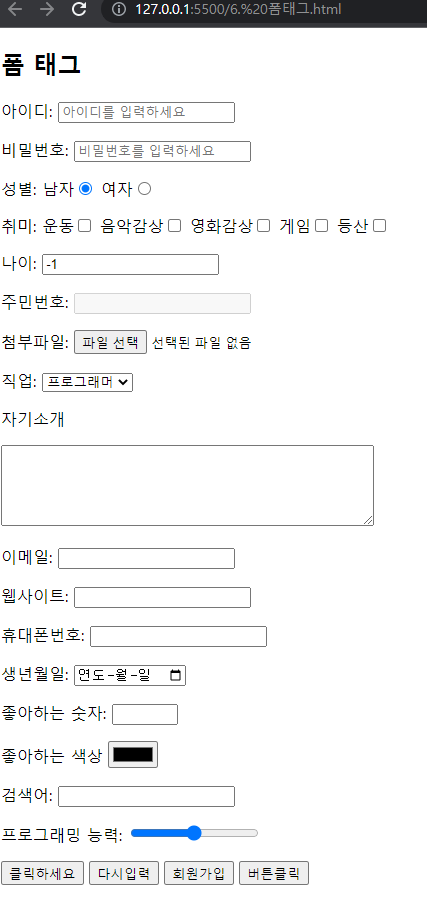
'HTML, CSS' 카테고리의 다른 글
(15)CSS_기본 문법 (1) 2023.03.28 (14)HTML_디스플레이 (0) 2023.03.27 (12)HTML_iframe (0) 2023.03.24 (11)HTML_테이블만들기2 (0) 2023.03.24 (10)HTML_테이블만들기1 (1) 2023.03.24